
Maintenance
Part of Digital finance security guide: identity, authentication, fraud, and recovery
Finance app security and recovery checklist
Finance app security checklist for identity proofing, authenticators, sessions, devices, transactions, alerts, recovery, support, records, and response.
What to take away
- Review enrollment, authentication, sessions, payments, recovery, and support as one system.
- Maintain more than one independent authenticator before a phone or key is lost.
- Make devices, sessions, connected apps, and profile changes visible to the account owner.
- Treat recovery and support as privileged workflows with clear notices and records.
- Test the checklist with lost-device, compromised-email, and unauthorized-payment scenarios.
This checklist works for a product review, internal control assessment, or personal account setup. Mark each item as confirmed, missing, unclear, or not applicable. Record the evidence, owner, and next action rather than relying on a marketing claim.
Identity proofing and enrollment
- The service states what identity evidence it collects and why.
- Failed or inconclusive proofing has a clear redress route.
- Enrollment records distinguish verified evidence from risk signals.
- Duplicate, synthetic, stolen, and manipulated identity risks are considered.
- Sensitive evidence has a retention and deletion rule.
- Accessibility and name, address, or document mismatches have support paths.
NIST's identity proofing and enrollment guidance covers proofing, enrollment, fraud management, privacy, customer experience, and redress for federal digital identity systems. Use its categories as a review frame, while applying the product's own legal and risk requirements.
Identity proofing enrollment review
- State identity evidence collected and why
- Provide redress for failed proofing
- Separate verified evidence from risk signals
- Address duplicate, synthetic, stolen identity risks
- Set retention and deletion rule
- Support accessibility and mismatch paths
Authenticators
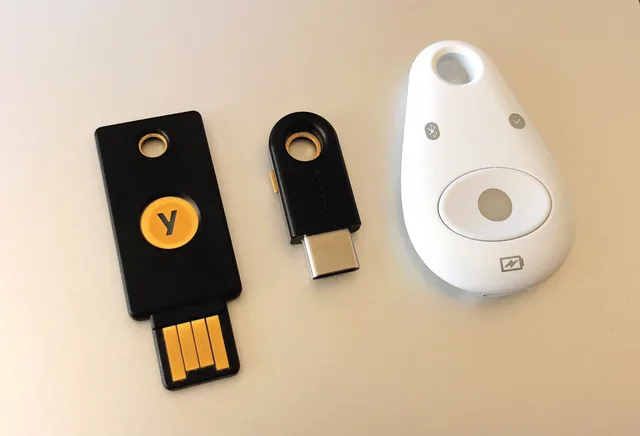
- A phishing-resistant option is available for sensitive access where practical.
- Passwords are unique and stored in a password manager.
- At least two independent authenticators can be enrolled.
- Enrolled passkeys, security keys, apps, and phone numbers are visible.
- Adding or removing an authenticator triggers a notice.
- Backup codes are stored away from the daily device.
- Rate limits and suspicious-attempt alerts are defined.
Sessions and connected access
- The user can see active devices and sessions.
- Remote sign-out and session revocation are available.
- Password or authenticator resets have a defined session effect.
- Sensitive actions require recent authentication.
- Connected data apps and delegated users are listed.
- Access tokens can be revoked without sharing a password.
- Session logs avoid exposing secrets.
Device controls
- The phone or computer runs supported, updated software.
- A strong screen lock and short automatic lock interval are set.
- Lost-device location, lock, or erase tools are configured.
- Backups are encrypted and recoverable.
- App installation comes from a trusted store or verified publisher.
- Notification previews do not expose sensitive codes or balances.
- Rooted, jailbroken, or managed-device risks are addressed.
Payments and profile changes
- The approval screen shows amount, destination, source, and timing.
- New recipients and destination changes receive extra checks.
- Security changes followed by payments trigger review.
- Payment limits and hold behavior are documented.
- Alerts cover new devices, recipients, payments, and recovery changes.
- Users can report an event without approving a new prompt.
- Cancellation, recall, and dispute limits are stated without guarantees.
Email and mobile service
- The connected email account has unique authentication.
- Email forwarding rules and recovery contacts are reviewed.
- The mobile carrier account has a separate PIN where available.
- Phone-number changes trigger notices to an existing channel.
- The product does not treat caller ID as proof of identity.
- Support can be reached through a verified address or number.
FTC guidance on protecting personal information from hackers and scammers supports software updates, strong unique passwords, two-factor authentication, and careful handling of phishing messages. Those practices cover part of this checklist; they do not establish that a specific finance service is secure.
Recovery and support
- Recovery is separate from ordinary authentication.
- The user knows which channel starts recovery.
- Existing trusted contacts receive recovery notices.
- Recent profile changes increase scrutiny or delay high-risk recovery.
- Support agents cannot view passwords or full recovery secrets.
- Agent actions are logged and reviewable.
- An escalation path exists for inaccessible accounts.
- Recovery ends unknown sessions and replaces compromised authenticators.
Records and response
- Transaction statements and confirmations can be exported.
- Security alerts include useful time and device details.
- Case numbers and written outcomes are retained.
- The response plan names the provider, bank, carrier, and reporting channels.
- Evidence can be preserved before a device is reset.
- The plan distinguishes unauthorized access from an authorized payment induced by a scam.
- Monitoring continues after access is restored.
Three test scenarios
| Scenario | The test passes when |
|---|---|
| Lost phone | Access can be contained and restored without the missing device alone |
| Compromised email | Recovery does not depend only on the hostile inbox |
| Unknown payment | The user can report it, preserve evidence, and follow the applicable dispute process |
Run the tests before an incident. A recovery method that exists only in a settings menu may fail when the user has no working device or cannot pass the ordinary login.
Common questions
How often should I run the checklist?
Review it after major app changes, a new device, altered recovery details, and at least once a year.
Is two-factor authentication enough?
No. Sessions, connected apps, recovery, devices, transaction approval, and support controls also matter.
Should I save backup codes on my phone?
Keeping the only copy on the same phone creates a single point of failure. Store a protected copy separately.
Can a checklist prove an app is secure?
No. It organizes evidence and gaps. It does not replace testing, monitoring, legal review, or incident experience.