Rules
Part of Digital wallet guide: Credentials and payment flows
Digital wallet problems: lost devices, token confusion and unsupported terminals
Digital wallet problems can start with a lost device, token, terminal, or balance mismatch. Trace the failure before deleting the app or retrying a payment.
What to take away
- A lost phone is two events at oncea device-security problem and a payment-access problem.
- "Token error" describes at least five different things. Ask which one before you act.
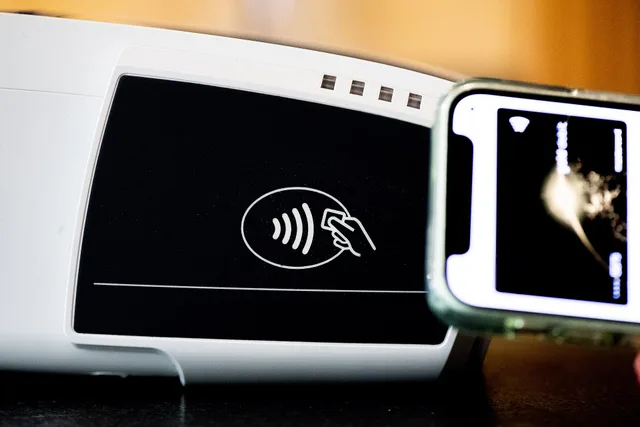
- A contactless symbol on a terminal shows the reader works, not that your wallet is accepted there.
- Your wallet history is not your account statement. Compare the merchant receipt and every funding account.
- Reinstalling the app can clear the evidence you need and provision a fresh credential. Test recovery first.
Wallet troubleshooting fails when every symptom gets blamed on the app. The fault usually sits in one layer. That layer may be one of the following:
- the device
- the cloud account
- the credential
- the terminal
- the merchant's configuration
- the network route
- the issuer's decision
- a stored-balance ledger
Examples include Apple Pay, Google Wallet, and Samsung Wallet for device-based card payments, and PayPal, Cash App, and Venmo for other wallet or payment services. The troubleshooting path depends on whether the problem involves a card credential, a stored balance, or a person-to-person payment.
Preserve the exact error wording and the transaction state before you touch anything. Then find the layer.
Start with the word token
"Token error" is the least useful phrase in wallet support, because it covers five unrelated things.
Five token types and failures
Token type
- Payment token
- Stands in for card
- Session token
- Keeps you signed in
- Verification code
- Confirms enrollment step
- Crypto token
- A digital asset
- API access token
- Authorizes system connection
What it does
- Payment token
- Suspended, expired, unprovisioned
- Session token
- Expired, revoked access
- Verification code
- Wrong, expired, intercepted
- Crypto token
- Wrong network or contract
- API access token
- Revoked scope, provider outage
How it fails
- Payment token
- Session token
- Verification code
- Crypto token
- API access token
| Token meaning | What it refers to | What it does not mean |
|---|---|---|
| EMV payment token | A substitute for a card number used in a payment credential, sometimes limited to a device or payment setting. | A password for signing in. |
| Login or session token | A credential that represents an authenticated app or account session. | A replacement card number. |
| Verification code | A one-time code used to confirm an action or identity. | A payment token; do not share it with someone offering support. |
| API access token | A software credential that allows an application or service to access a resource. | A card credential or a code to send to a support caller. |
| Cryptoasset token | A digital asset recorded and transferred on a blockchain. | A tokenized card number used at a checkout terminal. |
EMVCo's explanation of EMV payment tokenisation covers the first row only. A payment token replaces the primary account number with a value whose use can be limited to one merchant, one device or one payment setting. It says nothing about a login token, a verification code or a cryptoasset.
Write down the device, wallet, card suffix, exact error text, date and the action that triggered it. Never send a full card number, a password or a one-time code to anyone who offers to "repair" a token.
A card that will not enroll
Enrollment failures cluster into a short list:
Why a card will not enroll
- Unsupported issuer or card product
- Unsupported region or device
- Billing identity mismatch
- Issuer verification step failed
- Outdated operating system
- Device-integrity restriction
- Too many active device credentials
Other enrollment checks include:
- The card or wallet is not eligible for provisioning by the issuer.
- The details supplied by the issuer do not match the wallet enrollment information.
- The device or wallet software does not meet the provider's requirements.
Ask the wallet and the issuer which party declined the provisioning, and whether a partial token already exists. Repeated attempts can trip issuer fraud alerts and leave several half-built credentials behind.
Never fix an identity mismatch by typing false details. Correct the issuer record instead.
The terminal shows the contactless symbol and the wallet still fails
That symbol describes the reader, not the merchant's acceptance policy. A merchant can disable a route, run outdated terminal software, or apply a transaction condition your payment does not meet. The issuer can also decline.
EMVCo's EMV Contactless specifications describe contactless payment acceptance, but a contactless-capable reader does not guarantee that a merchant accepts every card or wallet route. The merchant's enabled configuration and the underlying card network, such as Visa or Mastercard, can matter.
Work in this order:
- Check that the reader is contactless-capable, then ask the merchant whether contactless payments are enabled for this sale.
- Confirm that the merchant accepts the underlying card and its network, and ask whether any transaction condition limits contactless payment.
- Check that the wallet is using the intended eligible card and that the phone is ready for the required authentication.
- Ask the merchant to restart the sale if needed, then make one deliberate tap at the reader. Do not keep retrying.
- If the purchase is still needed, use a payment method the merchant confirms it accepts rather than making repeated taps as a test.
- Record the exact response and ask the merchant whether the terminal rejected the tap or the issuer declined it. Contact the wallet provider or issuer with those details if the cause is still unclear.
Terminal failure response order
- Confirm the amount on the terminal
- Hold the device at the reader
- Wait for the terminal's own response
- Ask cashier whether approval was received
- Check wallet and issuer for pending entry
- Fall back to a verified method
Do not tap repeatedly. Each tap can open a separate authorization request even when no receipt prints.
The phone says done and the merchant says declined
Your phone can confirm the local authentication and the credential transmission before the full card response comes back. Whether a card transaction was approved and later posted is decided by the merchant terminal and the issuer record, not by the checkmark on your screen.
Save the phone message, the merchant's result, any receipt, and the issuer activity. If a pending hold appears after a declined sale, ask the issuer how long it holds authorizations. Do not demand a refund from a merchant that never captured the transaction.
The last four digits do not match your card
A wallet often displays the suffix of a device-specific payment token, not the suffix printed on the plastic. Confirm it through the issuer or the wallet provider. A different suffix is not a reason to delete the card.
Map device credentials to cards
Device
- Phone
- Watch
- Tablet or browser
Wallet credential suffix
- Phone
- Watch
- Tablet or browser
Underlying card suffix
- Phone
- Watch
- Tablet or browser
Status
- Phone
- Watch
- Tablet or browser
Build a map instead, so an issuer can suspend one device without guessing which credential made a purchase.
| Device | Wallet credential suffix | Underlying card suffix | Status |
|---|---|---|---|
| Phone | |||
| Watch | |||
| Tablet or browser |
A lost phone that still holds wallet access
Use the remote loss controls from a device you still trust. Contact the wallet provider and each issuer through a channel you looked up yourself, not one from an incoming message.
The CFPB's mobile payment safety tips tell consumers to notify the bank or payment provider when a phone is lost or stolen. That page also covers person-to-person apps, so decide first whether the affected product is a card wallet, a stored-balance app, or both.
Secure the carrier account and the cloud recovery channel too. Someone holding your unlocked email can reset the financial logins that depend on it.
Two balances that disagree
Label both numbers before comparing them. A wallet available balance, a wallet ledger balance, a bank available balance, a bank ledger balance, a pending incoming transfer and a pending card authorization are six different figures.
Six different balance figures
Figure
- Wallet available balance
- Wallet
- Wallet ledger balance
- Wallet
- Bank available balance
- Bank
- Bank ledger balance
- Bank
- Pending incoming transfer
- Either
- Pending card authorization
- Either
System
- Wallet available balance
- Wallet ledger balance
- Bank available balance
- Bank ledger balance
- Pending incoming transfer
- Pending card authorization
A wallet can credit its internal ledger before the money settles externally. A bank can show a debit before the wallet releases funds. A stale data connection can simply display an old bank value.
Trace one transaction by amount, date, status and both systems' reference numbers. Do not post a manual correction until you have identified which movement is missing or duplicated.
The purchase is missing from the card statement
Check whether the wallet used a different default card.
Check whether the transaction is still pending.
Check whether the merchant submitted it late.
Check whether the wallet record is only an attempted payment.
Check whether a stored balance funded it.
Check whether the descriptor differs.
Check whether the item was reversed.
Wallet history is not always the legal account statement. Compare the merchant receipt and every account that could have funded the purchase.
When reinstalling made it worse
Reinstallation can wipe local data, clear diagnostic detail and force a fresh credential provisioning. Before you delete anything:
Before deleting or reinstalling, use this checklist:
- Save the exact error text, date, time, device, wallet, and card suffix.
- Record transaction references and whether each entry is pending, posted, reversed, or missing.
- Confirm you can access the wallet account, its recovery method, and any linked cloud account through official channels.
- Save or export available wallet records and check the relevant funding accounts for balances and transactions.
- Contact the wallet provider or issuer through a channel you looked up yourself if a credential or transaction needs attention.
Before reinstalling the wallet
- Capture error text and app version
- Export the records you need
- List cards and passes in wallet
- Confirm cloud synchronization is current
- Check any stored balance
- Verify you can still recover account
- Ask whether removal suspends token
Reinstall only when official troubleshooting supports it, and only after you have tested recovery.
A payment that reached the wrong person
This is usually a person-to-person or QR payment, not a contactless card purchase. Save the recipient identifier, amount, time, funding source and transaction status, then contact the provider through an authenticated channel.
Do not send a second payment to anyone promising to return the first. Treat unsolicited recovery offers as what they are: a second attempt.
The escalation packet
Support resolves cases faster when the record is short and redacted. Include the device and operating-system version, the wallet version, and the credential suffix. Include the exact error text, the date, time, merchant and amount. Include whether the entry is pending or posted, and the steps you already tried. Include the transaction references, and the action you want next.
Send no passwords, no full card numbers, no security codes, no seed phrases and no one-time verification codes.
Common questions
Why does my wallet show a card number I do not recognize?
It is usually the suffix of a device-specific payment token rather than your physical card. Verify it through official wallet or issuer support before you remove anything.
Does a contactless symbol mean every phone wallet works?
No. Reader hardware, merchant configuration, wallet eligibility, the transaction route and the issuer's approval all have to line up. The symbol only tells you the reader is contactless-capable.
Can deleting the app remove a balance?
The balance normally stays with the provider, because it sits on their ledger, not on your phone. Deletion can remove your local access and the evidence you need, so confirm recovery and export your records first.
What should I do first after losing a phone?
Use remote loss controls, notify the wallet and financial providers through channels you looked up yourself, and secure the carrier and cloud accounts. Then review transactions on every funding account, not just the wallet.